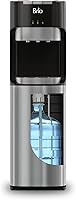
How to Use an Avalon Water Dispenser
To use an Avalon water dispenser, set a 3 to 5 gallon bottle into the bottom cabinet, plug it in, and let it chill for a few hours, then press the spout button for cold, room or hot water. Lift the hot spout's child lock each time, and clean the unit every few months.
On this page (8 sections)
- How do you set up an Avalon water dispenser the first time?
- How do you load and change the water bottle?
- How do you dispense cold, room and hot water?
- What temperatures should you expect from the hot and cold tanks?
- How do you use the nightlight and empty-bottle indicator?
- How do you keep an Avalon dispenser clean and safe to use?
- What should you do when the dispenser stops working?
- Which Avalon dispenser should you pick?
To use an Avalon water dispenser, set a 3 to 5 gallon bottle into the bottom cabinet, plug it in, and let it chill for a few hours. Then press the spout button for cold, room or hot water, lifting the hot spout's child lock each time.
Bottom loading means no lifting a heavy bottle onto the top of the unit.
This guide covers how to use an Avalon water dispenser from the first setup through daily pouring and regular cleaning. Most steps are the same on the Avalon A4 and the self-cleaning model, so you can follow along with either.
How do you set up an Avalon water dispenser the first time?
Place the cooler on a flat floor near a grounded outlet, load a full bottle into the bottom cabinet, then plug it in. Give it a few hours before you expect cold water.
The unit needs time to chill its cold tank from room temperature.
Start by wiping the inside of the cabinet and the drip tray. Set the cooler where the spouts sit at a comfortable height for your tallest glass, since the A4 stands 41 inches tall.
Check that the cord reaches the outlet without an extension cord stretched across a walkway. The A4 weighs about 38 lb and the self-cleaning model about 50 lb, so have a second person help move it into place.
Load a bottle that holds 3 to 5 gallons. Bottom-loading models pump water up from the cabinet, so the bottle sits upright on a probe rather than on top of the cooler.
Which Avalon model fits your setup?
The Avalon A4 Bottom Loading Water Cooler is the everyday pick for a home kitchen or office. It gives you three temperature settings, a stainless steel cabinet, a built-in nightlight and an empty-bottle indicator.
The Avalon Self-Cleaning Bottom Loading Water Cooler suits anyone who wants a push-button sanitizing cycle without doing the whole job by hand. It also adds a child safety lock on the hot spout.
Both hold 3 to 5 gallon bottles and both load from the bottom. The self-cleaning model's main extra is the sanitizing cycle; the A4 keeps things simple with a light that shows when the bottle runs out.
If you're still weighing brands, our Brio vs Avalon water dispenser comparison covers the differences.
How do you load and change the water bottle?
Open the bottom cabinet, lift out the empty bottle, and set a full one onto the probe until it seats firmly. Close the door and the pump takes over.
Each new bottle needs a short prime before water flows from the spouts.
The empty-bottle indicator on both Avalon models lights up when the supply runs low, so you know when to swap. A 5 gallon bottle weighs about 40 lb when full, which is why the bottom cabinet helps.
You lift the bottle only a short distance instead of raising it overhead.
Check that the bottle's seal is removed and the neck sits flat on the probe. A bottle set at an angle can pull air and stop the pump.
Our walkthrough on how to change water bottle on dispenser covers the bottom-load steps in order.
Let the unit run for a moment after a bottle change so any air in the line clears. Then pour and check the flow before filling a full pitcher.
How do you dispense cold, room and hot water?
Press the spout button for the temperature you want and release it when your glass is full. The A4 and the self-cleaning model both use push-button spouts for hot, cold and room-temperature water.
The hot button needs the child lock lifted first.
Cold water pours from the chilled tank after the first few hours. Room-temperature water comes straight from the bottle, so it's ready as soon as the bottle is loaded.
Hot water takes a short wait while the 420W heater brings the small hot tank up to temperature.
Place your glass under the spout before you press. The self-cleaning model's dispensing area is 12 x 3 x 10 inches with about 9 inches below the spouts, which fits most large cups and bottles.
Use the drip tray to catch splashes and empty it when it fills.
How does the child safety lock work?
Lift the lock tab on the hot spout, then press the hot button. The lock springs back when you release, so it stays on for the next person.
Keep it engaged around young children, and don't defeat it by taping or wedging the tab.
The self-cleaning Avalon model carries the child lock and UL listing together. The lock is there because the hot faucet runs near 185°F on that unit, which is hot enough to scald.
Teach everyone in the house to lift the tab only while they hold a cup in place.
What temperatures should you expect from the hot and cold tanks?
Both Avalon models chill water to about 47°F (8.3°C), while the hot faucet reaches about 185°F. Those figures come from Avalon's published specs.
Actual cup temperature varies with room temperature and how much water you draw at once.
The cold setting uses a 100W compressor. Give the tank time to recover after filling several glasses in a row; a busy office will draw more cold water than a home kitchen.
The hot setting uses a 420W heater. It's meant for tea, coffee and instant drinks, not for cooking.
Pour hot water into a mug or a heat-safe cup and let it cool before you drink.
If the hot water stays cold, run through the basic checks in our guide to water dispenser hot water not working before calling support.
How do you use the nightlight and empty-bottle indicator?
Switch on the nightlight from the back of the unit, and watch the empty-bottle light so you know when to reload. The nightlight lights the spouts so you can pour in a dark kitchen without turning on the overhead light.
It draws very little power, so leaving it on is fine.
The empty-bottle indicator glows when the bottle runs out. When you see it, swap the bottle and let the pump refill the tanks.
Don't keep pressing the spouts on an empty bottle; the pump runs dry and the cooler has nothing to dispense.
How do you keep an Avalon dispenser clean and safe to use?
Clean the dispenser every three to six months with a dedicated water dispenser cleaner, and run the self-clean cycle on the self-cleaning model. Wipe the spouts and drip tray more often.
A clean cooler is what keeps the water tasting fresh.
Unplug the unit and drain the tanks before a deep clean. Remove the bottle, then follow the cleaner's directions for the reservoir.
The IMPRESA kit comes as two 8 oz bottles and works with top and bottom loading coolers.
The self-cleaning Avalon model sanitizes its own tank on a cycle, so you still wipe the spouts and drip tray by hand. On the A4, the cleaning job is manual from start to finish.
Either way, rinse well and let the unit dry before you reload a bottle.
How do you run the self-clean cycle?
Fill the reservoir as Avalon's use and care guide directs, start the cycle, then drain and rinse. The guide that ships with the cooler covers the exact steps and timing for your model.
Run the cycle before you load a fresh bottle so the water you drink comes from a clean tank.
Plan the cycle for a time when nobody needs the cooler for a while. Keep the door closed during the cycle and wipe up any splashes afterward.
What should you do when the dispenser stops working?
Check the bottle first, then the power, then the spouts. Most stoppages come from an empty bottle or a bottle that isn't seated on the probe.
If the unit is plugged in and the bottle is full but nothing pours, unplug it and contact Avalon support.
The A4 and the self-cleaning model both carry a one-year warranty from Avalon. Keep the use and care guide and your purchase details on hand in case you need service.
Don't open the cabinet or try to repair the compressor or heater yourself.
If cold water stops but hot still works, or the reverse, the problem is usually in one tank or its thermostat. A quick call to support saves time over guessing.
Which Avalon dispenser should you pick?
Pick the Avalon A4 if you want the simplest bottom-loading cooler for a kitchen or office. Pick the self-cleaning Avalon if you'd rather let a cycle handle sanitizing and you have young children at home.
Add the IMPRESA cleaner for the manual scrubbing either model still needs.
Once you know how to use an Avalon water dispenser, the routine is short: load a bottle, wait for the tanks to chill and heat, pour from the right spout, and clean on schedule. If you're comparing bottle formats before you buy, our Avalon vs Primo water dispenser for 5-gallon jugs guide covers the differences.
Frequently asked questions
How do you turn on an Avalon water dispenser?
Load a 3 to 5 gallon bottle into the bottom cabinet and close the door, then plug the cord into a grounded outlet. The compressor starts on its own and chills the cold tank; press the cold button and let it run before you expect cold water.
Why won't my Avalon dispenser pump water?
The usual cause is an empty bottle or a loose bottle seal. The empty-bottle light comes on when the supply runs out, so swap the bottle and check that it sits firmly on its probe.
If it still won't pump, unplug it and contact Avalon support.
Do you have to press a button for water on an Avalon cooler?
Yes. The Avalon A4 and the self-cleaning model dispense from push-button spouts, so you press the button for the temperature you want and release it to stop the flow.
The hot spout also has a child safety lock you must lift first.
How often should you clean an Avalon water dispenser?
Clean the unit every three to six months, or sooner if you notice buildup or odd tastes. Use a dedicated water dispenser cleaner such as IMPRESA's two-bottle kit, and run the self-clean cycle on the self-cleaning Avalon model.
Can you put tap water in an Avalon dispenser?
Yes, the dispenser works with any water you load into the bottle. Use a 3 to 5 gallon bottle filled with tap or filtered water.
The dispenser cools and heats what you put in, so the water quality depends on what goes in the bottle.