Brio Water Dispenser Troubleshooting: Quick Checks
For Brio water dispenser troubleshooting, check the bottle connection, power, and selected spout first. If those look right, use the dispenser’s controls and care instructions to narrow down the problem.
On this page (9 sections)
- What should you check first when a Brio dispenser has a problem?
- Why is a Brio water dispenser not dispensing water?
- What should you check if a Brio cooler is not getting cold?
- Why is the hot water not working?
- What if the dispenser leaks or makes an unusual sound?
- How should you clean a Brio water dispenser?
- Which Brio models are relevant to these quick checks?
- When should you stop troubleshooting and contact Brio?
- What is the quickest way to narrow down a Brio water dispenser issue?
For Brio water dispenser troubleshooting, check the bottle connection, power, and selected spout first. If those look right, use the controls and care instructions for your model to narrow down the problem.
Many basic symptoms have a simple cause, such as an empty jug, a loose connection, or a control that is off. Unplug the dispenser before cleaning or inspecting parts, and don't open its cabinet or attempt electrical repairs.
What should you check first when a Brio dispenser has a problem?
Start with the bottle, power, and controls. These checks cover common causes without taking the cooler apart.
- Make sure the bottle has water and sits correctly in the cabinet.
- Check that the dispenser is plugged into a working outlet and switched on.
- Confirm the temperature control is set for the water you want.
- Wait after setup or a bottle change for the cooler to reach its operating temperature.
- Check the manual for your model before trying a reset or cleaning procedure.
If the dispenser shows an alert, read the manual to learn what that indicator means. A bottle alert can help you spot a low or empty jug, but it doesn't diagnose every water-flow problem.
For a general guide to the unit style, see how bottom-load water coolers work. If you're comparing Brio with another brand, our Brio and Avalon dispenser comparison covers the buying decision.
Why is a Brio water dispenser not dispensing water?
Check the jug, connection, and spout selection before assuming the pump has failed. A bottle that isn't seated as intended or a button for a different temperature can make the dispenser seem unresponsive.
Make sure the bottle contains water and is positioned according to the manual. On a bottom-load model, check the bottle connection without forcing it or pulling on tubing.
Press the button or paddle for the temperature you want. For hot water, release the child safety lock first if your model has one; the lock is a safety feature, not a fault.
If only one temperature has no flow, avoid repeated button presses. Check the manual for that model's troubleshooting steps, and stop using the unit if you notice a leak or damaged cord.
Can a Brio bottle alert explain the problem?
A bottle alert means check the jug and its connection first. On Brio models with an empty-bottle alert, the indicator is there to remind you when the bottle needs attention.
Replace an empty bottle using the manual's steps. Our guide to changing a bottle on a bottom-load dispenser explains the basic process.
If the alert stays on with a full bottle, confirm that the jug is seated and connected as directed. Don't bypass a sensor or dismantle the cabinet to clear an alert.
What should you check if a Brio cooler is not getting cold?
Confirm that the cooler is powered and its cold-water control is enabled, then allow time for the water to cool. A dispenser may need time after setup or a bottle change before the water feels cold.
Check the model manual for the startup and cooling instructions. Make sure the unit has space around it as directed, and avoid changing temperature controls repeatedly while waiting.
If the water remains warm after the recommended wait, unplug the cooler and contact Brio support for model-specific help. Don't remove panels or work on electrical parts.
For more causes to consider, see what to check when a water cooler isn't cooling. That guide covers general dispenser checks beyond Brio models.
Does the Brio cold-water switch need to be on?
Some dispensers have separate controls for hot and cold functions. Check your model's manual and control labels to confirm the cold function is enabled.
Don't guess at switches inside the cabinet. If the controls are unclear or the cold setting won't stay on, use the manual or contact Brio support.
Why is the hot water not working?
Check the hot-water control and safety lock first. A two-step lock can prevent hot water from dispensing until you release it as instructed.
Confirm that the dispenser is plugged in, switched on, and has had time to heat after setup. Follow your model's manual for the hot-water startup steps and any indicator lights.
Keep children away from the hot spout while checking it. If the unit trips a breaker, smells unusual, leaks, or remains cold despite the correct setup, stop and contact support.
Our hot-water dispenser troubleshooting guide covers general checks for a hot spout that isn't working.
What if the dispenser leaks or makes an unusual sound?
Stop using a leaking dispenser and check only the bottle position and visible connections. Unplug the unit if water is near the cord or outlet, and keep the area dry.
A low hum or brief sound may occur during normal operation, but a new or loud sound deserves attention. Check that the unit is level and the bottle is seated as the manual directs.
Don't tilt a full cooler, tighten hidden fittings, or open the cabinet. Contact Brio support if the leak continues or the sound comes with poor water flow or temperature problems.
How should you clean a Brio water dispenser?
Use the cleaning method and schedule in your exact model's manual. Cleaning needs vary by model, and incorrect products or steps can leave residue or damage water-contact parts.
Unplug the dispenser before cleaning if the instructions call for it. Use only the cleaner and rinse procedure permitted by Brio, and never mix cleaning products.
The H2OK Water Cooler Cleaner is a cleaner option, but the available product details don't specify its ingredients or directions. Check compatibility and follow Brio's cleaning instructions before using any solution.
For a step-by-step overview, read how to clean a bottom-load water cooler. If you want a Brio model with a stated UV self-cleaning feature, the Brio 520 Series Self-Cleaning Bottom Load Cooler is a separate option to compare.
Self-cleaning features don't remove the need to follow the unit's manual for routine care. Don't assume that a cleaning cycle fixes a flow, heating, or cooling fault.
Which Brio models are relevant to these quick checks?
The same first checks apply to Brio bottom-load coolers, but reset and cleaning steps can differ by model. Confirm the model number on your unit before following instructions.
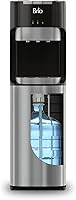
The Brio Bottom Loading Water Cooler, Stainless Steel, is described with hot, cold, and room-temperature settings, a child safety lock, and an empty-bottle alert. Those features help you identify which control or alert to check.
For a closer look at that cooler, see our Brio bottom-loading water cooler review. Its review can help you decide whether the listed controls and features suit your household.
When should you stop troubleshooting and contact Brio?
Contact Brio support when basic checks fail or the unit leaks, trips a breaker, or shows signs of electrical damage. Give support the model number and a clear description of the symptom.
Don't continue using a cooler with a damaged cord, water near electrical parts, or a persistent leak. Avoid opening the cabinet or trying an undocumented reset.
For a dispenser that still won't dispense after checking the bottle and controls, our guide to a water cooler that won't dispense has more general troubleshooting steps. Use the Brio manual for any model-specific instruction.
What is the quickest way to narrow down a Brio water dispenser issue?
For Brio water dispenser troubleshooting, check the bottle first, confirm power and settings, then follow the manual for the affected function. Use the model number when seeking support, especially if the problem involves a persistent leak, no cooling, or no hot water.
Choose the H2OK cleaner only if Brio's care directions allow it. Consider the Brio 520 if UV self-cleaning is a feature you want, or compare the stainless-steel Brio cooler if you want its stated three temperatures and bottle alert.
Frequently asked questions
Why is my Brio water dispenser not dispensing water?
Check that the bottle is seated and connected, the dispenser is powered, and you are pressing the button for the right temperature. If one spout still has no flow, stop using it and consult the manual for your model before opening or repairing the unit.
Why is my Brio water cooler not getting cold?
Confirm that the power is on and the cold-water control is enabled, then allow the unit time to cool after setup or a bottle change. If the water stays warm, check the model manual for its cooling instructions and contact Brio support if the issue continues.
How do I reset a Brio water dispenser?
Reset steps depend on the Brio model, so use its manual rather than trying a button sequence from another dispenser. If the manual directs a power reset, switch the unit off, unplug it, wait for the stated interval, then reconnect it and follow the startup steps.
How often should I clean a Brio water dispenser?
Follow the cleaning schedule and method in your specific Brio manual. Clean the reservoir and water-contact parts as directed, rinse thoroughly when the instructions call for it, and avoid mixing cleaners or putting solution through the unit unless Brio says to do so.